
Tables to Excel
Scan tables and export them to Excel
Upload a ledger or table and leave with a working spreadsheet.
Drop pages or folders here
Upload up to 10 pages in one document with your free allowance. Folders and large collections open the batch organizer.
HANDWRITTEN TABLES · BEFORE & AFTER
Your rows and numbers.
Ready for a spreadsheet.
Stock counts, timesheets, and expense ledgers. See the recognized rows and columns, review them beside the original, then export your own table to Excel.
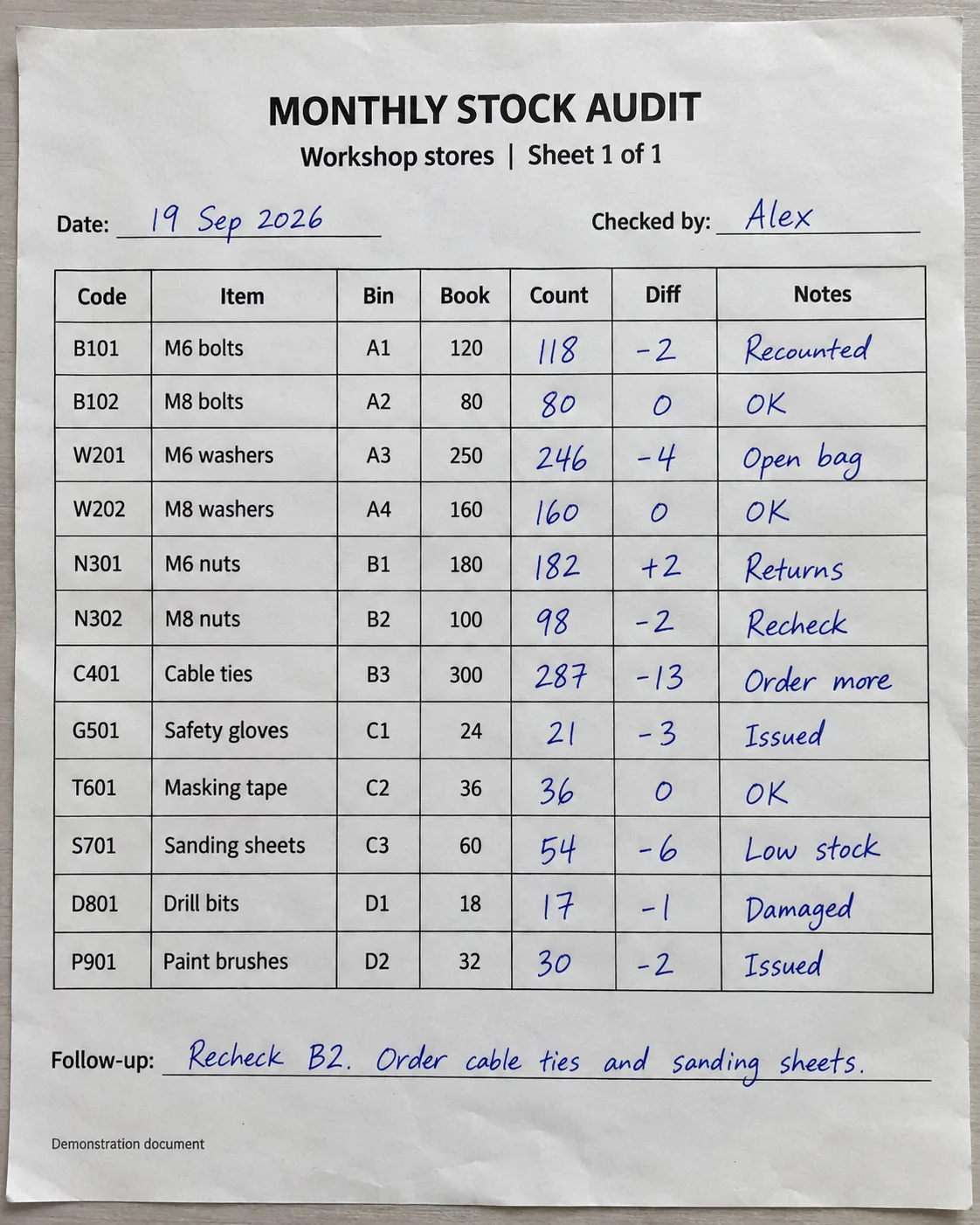
MONTHLY STOCK AUDIT
Workshop stores | Sheet 1 of 1
Date: 19 Sep 2026
Checked by: Alex
| Code | Item | Bin | Book | Count | Diff | Notes |
|---|---|---|---|---|---|---|
| B101 | M6 bolts | A1 | 120 | 118 | -2 | Recounted |
| B102 | M8 bolts | A2 | 80 | 80 | 0 | OK |
| W201 | M6 washers | A3 | 250 | 246 | -4 | Open bag |
| W202 | M8 washers | A4 | 160 | 160 | 0 | OK |
| N301 | M6 nuts | B1 | 180 | 182 | +2 | Returns |
| N302 | M8 nuts | B2 | 100 | 98 | -2 | Recheck |
| C401 | Cable ties | B3 | 300 | 287 | -13 | Order more |
| G501 | Safety gloves | C1 | 24 | 21 | -3 | Issued |
| T601 | Masking tape | C2 | 36 | 36 | 0 | OK |
| S701 | Sanding sheets | C3 | 60 | 54 | -6 | Low stock |
| D801 | Drill bits | D1 | 18 | 17 | -1 | Damaged |
| P901 | Paint brushes | D2 | 32 | 30 | -2 | Issued |
Follow-up: Recheck B2. Order cable ties and sanding sheets.
Demonstration document
Printed records and handwritten counts, together in one table. Review all 12 rows, variances, and notes before exporting to Excel. Scroll the result sideways to inspect every column.
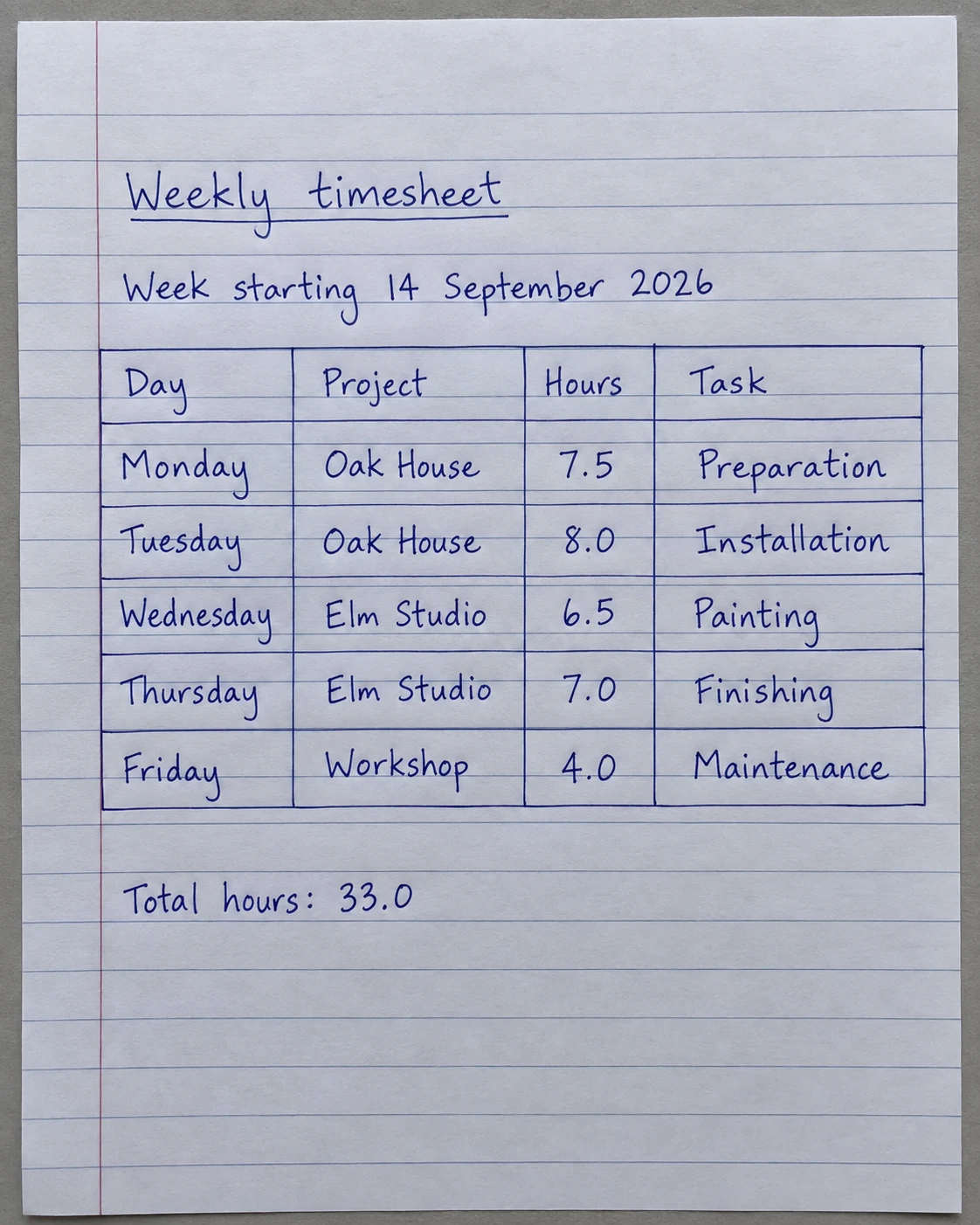
Weekly timesheet
Week starting 14 September 2026
| Day | Project | Hours | Task |
|---|---|---|---|
| Monday | Oak House | 7.5 | Preparation |
| Tuesday | Oak House | 8.0 | Installation |
| Wednesday | Elm Studio | 6.5 | Painting |
| Thursday | Elm Studio | 7.0 | Finishing |
| Friday | Workshop | 4.0 | Maintenance |
Total hours: 33.0
Recover the daily entries for a working timesheet. Check hours against the source before using them for billing.
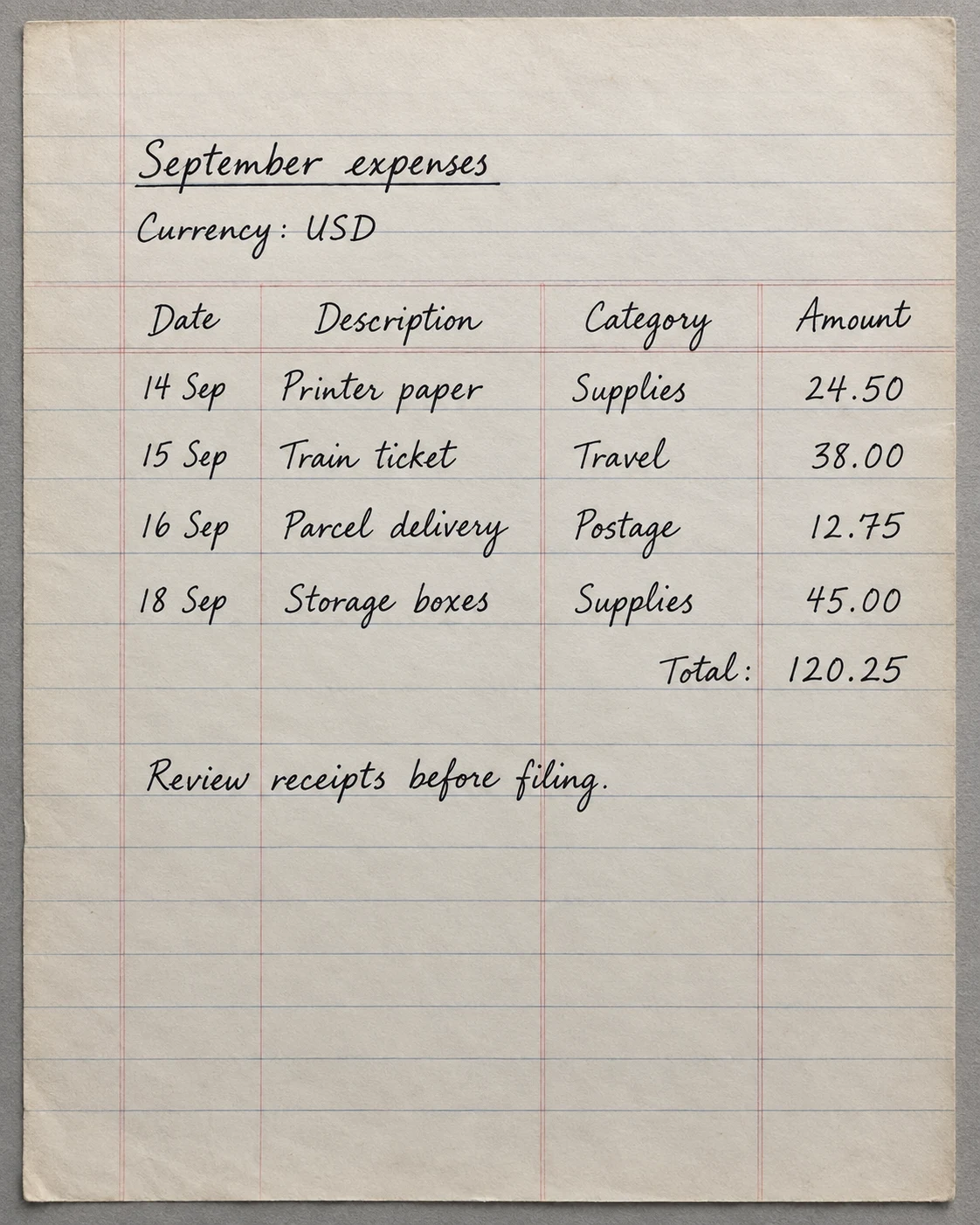
September expenses
Currency: USD
| Date | Description | Category | Amount |
|---|---|---|---|
| 14 Sep | Printer paper | Supplies | 24.50 |
| 15 Sep | Train ticket | Travel | 38.00 |
| 16 Sep | Parcel delivery | Postage | 12.75 |
| 18 Sep | Storage boxes | Supplies | 45.00 |
| - | - | Total: | 120.25 |
Review receipts before filing.
Bring dates, categories, and amounts into columns. Review the figures and receipts before using the exported spreadsheet.
AI-generated demonstration documents, transcribed with Inksight’s OCR. Results shown without text corrections. Accuracy and formatting vary with image quality and document structure. Always review names, numbers, and totals. These panels show OCR output, not Excel screenshots. Written totals are transcribed values, not calculated formulas.
Try your own table4.6 out of 5 on Google Play.
135 ratings · 32 written reviews · Play snapshot checked 30 August 2026
Nearly 99,000 completed production OCR pages · Production sessions recorded across 144 countries · Usage snapshot October 1, 2026. How these figures are counted
Convert handwritten tables into a working Excel spreadsheet.
Upload a ledger, register, inventory sheet, or handwritten grid. Inksight restores rows and columns so the result can be edited, sorted, and downloaded as Excel.
Ledgers and registers
Turn ruled paper, logbooks, and handwritten registers into structured rows and columns.
Inventories and field sheets
Move quantities, labels, dates, and notes into a spreadsheet without typing every cell.
Preview before download
Check the recognized table beside the original page, then export Excel, PDF, Word, or text.
OCR that ends in a spreadsheet.
The original stays visible while you review the result. Nothing is hidden behind a download until you know the page was understood.
| Capability | Inksight | Basic OCR |
|---|---|---|
| Rows and columns | Reconstructed as a table | Often flattened into text |
| Excel download | Native .xlsx output | CSV or copy only |
| Source-page review | Shown beside the result | Varies |
| Other exports | PDF, Word, and text included | Varies |
Handwriting recognition across 50+ languages.
Scan Latin-script notes in English, Spanish, French, Portuguese, and more, as well as Arabic, Hebrew, Hindi, Bengali, Tamil, Chinese, Japanese, Korean, and other supported scripts. Language is detected from the page—there is no selector to configure first.
Recognition quality varies with handwriting, image clarity, page angle, and document structure. Review important names and numbers before using an export.
Before you scan a page.
How do I convert a handwritten table to Excel?
Upload a photo, scan, or PDF of the table. Inksight reconstructs its rows and columns, lets you review the result, and exports a native Excel file.
Can I convert a handwritten ledger to Excel online?
Yes. The table tool is designed for ledgers, registers, inventories, and other ruled or hand-drawn tables.
Is the handwriting to Excel converter free?
Your first ten web pages are free, including Excel export. Later pages are completed as locked previews before you choose a plan.
Can I export the same table as PDF or Word?
Yes. Alongside Excel, completed documents can be downloaded as PDF, Word, or plain text.