
Image to text converter
Convert images and scans to editable text
Extract text from a photo, scan, or PDF. Review the result beside your page, then export to Word, Excel, PDF, or text.
Drop pages or folders here
Upload up to 10 pages in one document with your free allowance. Folders and large collections open the batch organizer.
IMAGE TO TEXT · BEFORE & AFTER
A page you have.
A document you can use.
A report to update. An invoice to reconcile. A job sheet to share. See how Inksight turns each page into structured, selectable text.
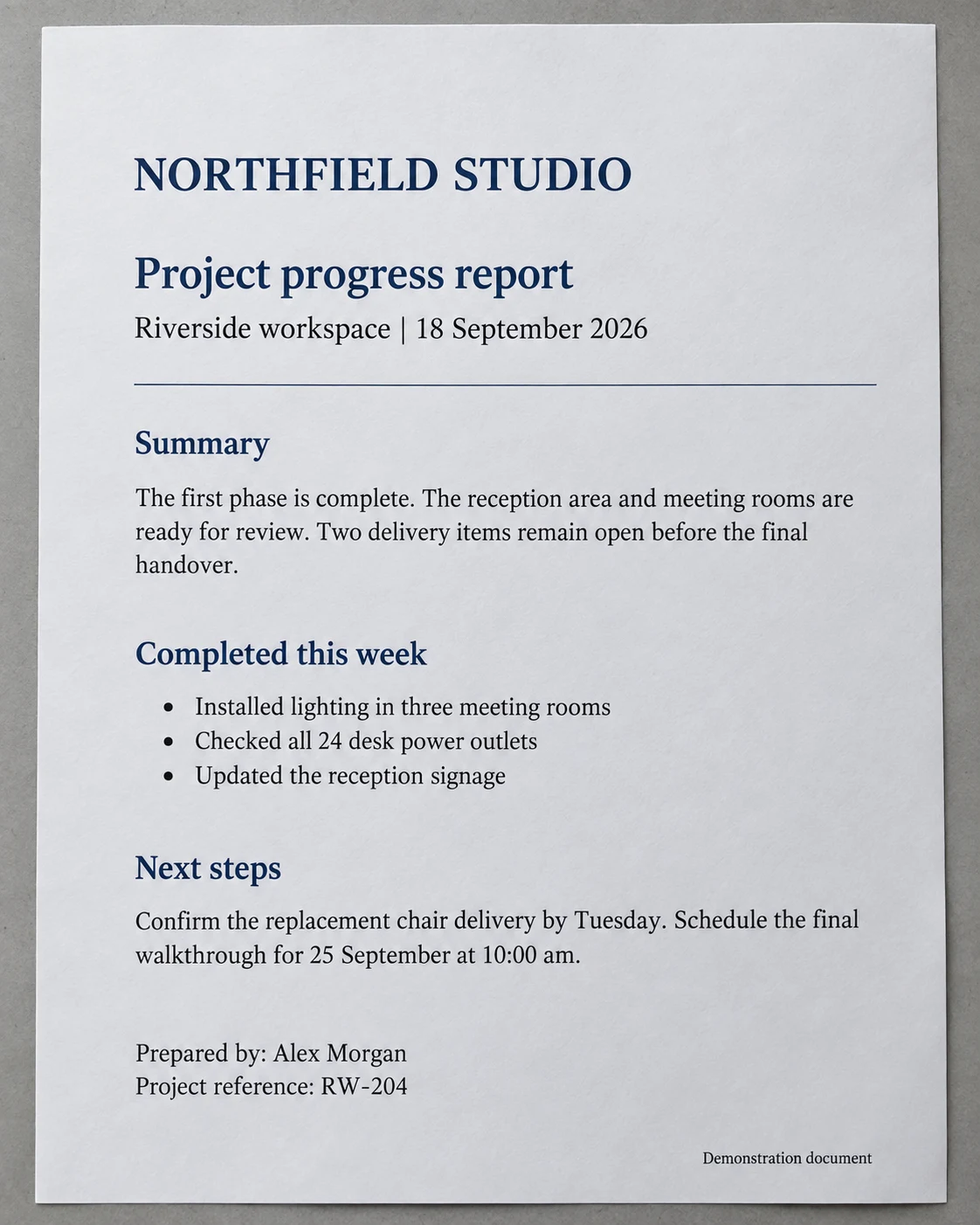
NORTHFIELD STUDIO
Project progress report
Riverside workspace | 18 September 2026
Summary
The first phase is complete. The reception area and meeting rooms are ready for review. Two delivery items remain open before the final handover.
Completed this week
- Installed lighting in three meeting rooms
- Checked all 24 desk power outlets
- Updated the reception signage
Next steps
Confirm the replacement chair delivery by Tuesday. Schedule the final walkthrough for 25 September at 10:00 am.
Prepared by: Alex Morgan
Project reference: RW-204
Demonstration document
Recover a report you need to update. Review the headings and bullet points, then export to Word instead of retyping the page.
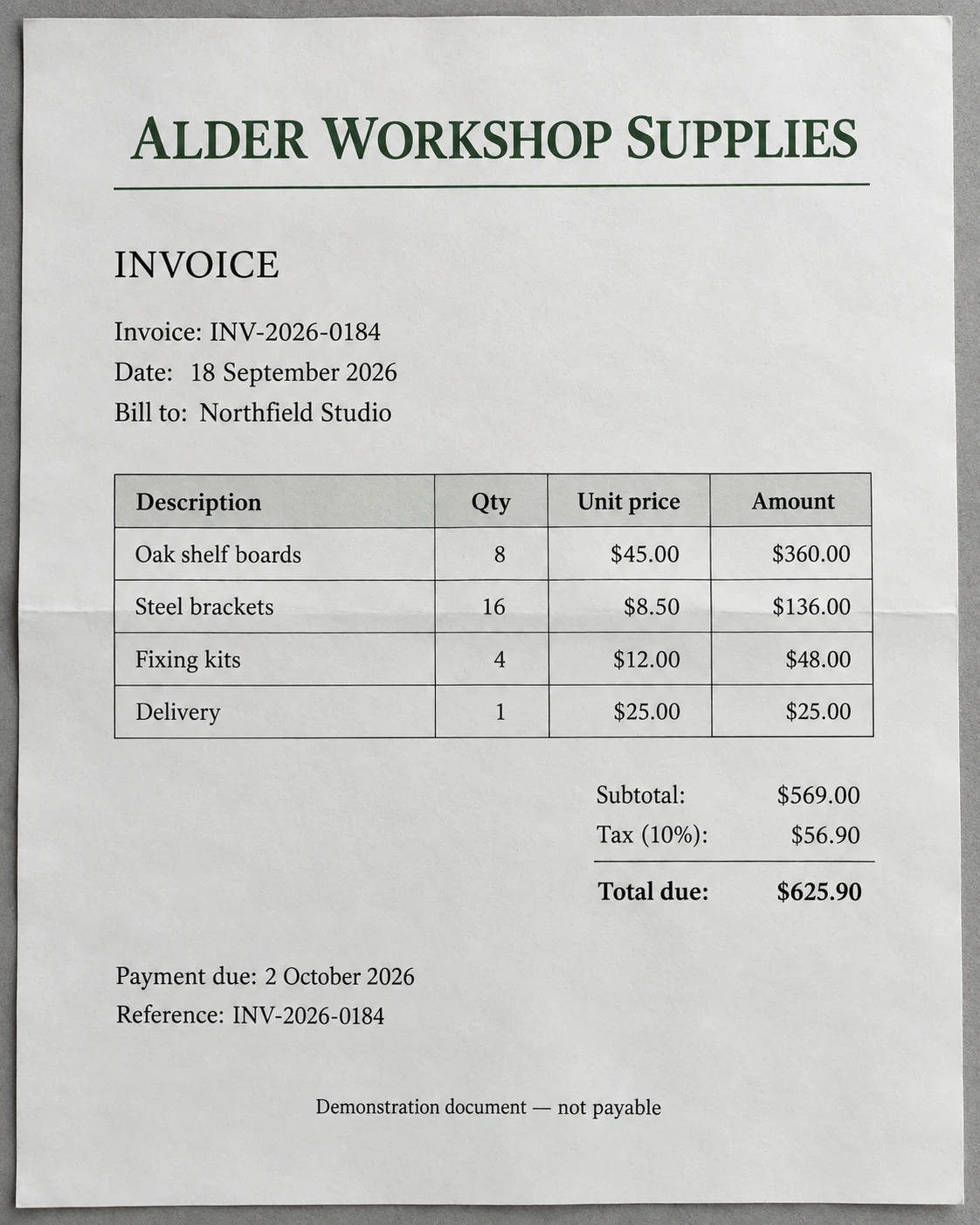
ALDER WORKSHOP SUPPLIES
INVOICE
Invoice: INV-2026-0184
Date: 18 September 2026
Bill to: Northfield Studio
| Description | Qty | Unit price | Amount |
|---|---|---|---|
| Oak shelf boards | 8 | $45.00 | $360.00 |
| Steel brackets | 16 | $8.50 | $136.00 |
| Fixing kits | 4 | $12.00 | $48.00 |
| Delivery | 1 | $25.00 | $25.00 |
| Subtotal: | $569.00 |
| Tax (10%): | $56.90 |
| Total due: | $625.90 |
Payment due: 2 October 2026
Reference: INV-2026-0184
Demonstration document — not payable
Move line items into a working spreadsheet. Check quantities, prices, and totals against the source before exporting the table to Excel.
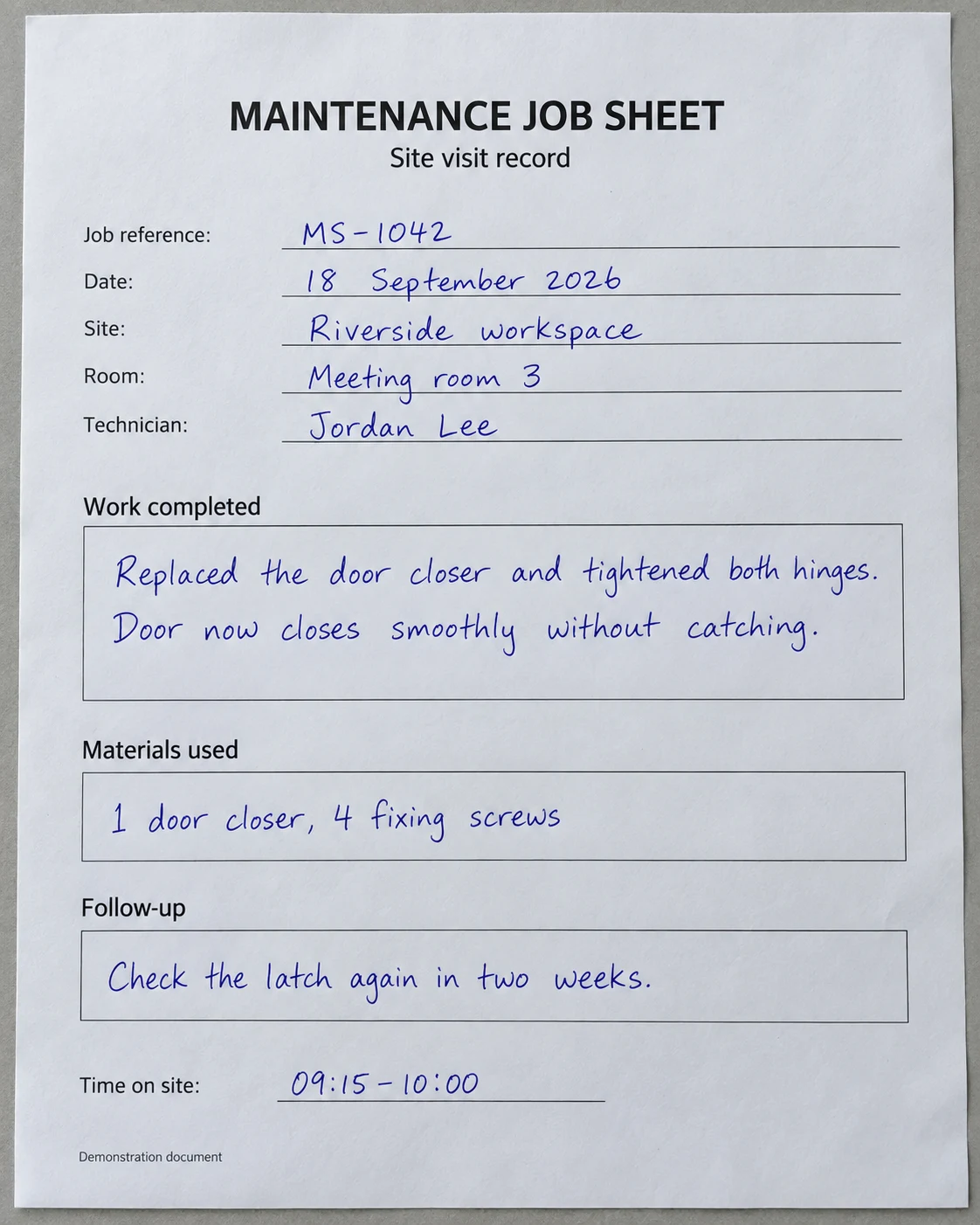
MAINTENANCE JOB SHEET
Site visit record
| Field | Details |
|---|---|
| Job reference: | MS-1042 |
| Date: | 18 September 2026 |
| Site: | Riverside workspace |
| Room: | Meeting room 3 |
| Technician: | Jordan Lee |
Work completed
Replaced the door closer and tightened both hinges. Door now closes smoothly without catching.
Materials used
1 door closer, 4 fixing screws
Follow-up
Check the latch again in two weeks.
| Field | Details |
|---|---|
| Time on site: | 09:15 – 10:00 |
Demonstration document
Keep printed labels and handwritten answers together. Turn a completed job sheet into notes you can edit, copy, and share.
AI-generated demonstration documents, transcribed with Inksight’s OCR. Results shown without text corrections. Accuracy and formatting vary with image quality and document structure. Always review names, numbers, and totals. Invoice extraction is not an accounting integration.
Try your own document4.6 out of 5 on Google Play.
135 ratings · 32 written reviews · Play snapshot checked 30 August 2026
Nearly 99,000 completed production OCR pages · Production sessions recorded across 144 countries · Usage snapshot October 1, 2026. How these figures are counted
Extract text from an image. Keep working on the document.
Turn printed reports, invoice tables, and completed forms into editable content. Upload a photo or scanned PDF, check the result beside the original, then copy the text or choose an export.
Images and scans to Word
Recover text from JPG images, phone photos, screenshots, and scanned PDFs. Review the headings and paragraphs, then download a Word document you can update.
Document tables to Excel
Extract rows and columns from an invoice or inventory sheet. Check the recognized values beside the source, then export the table to Excel for further work.
Printed forms with handwritten answers
Read printed labels and handwritten entries on the same page. Copy the completed record or export a document to share with your team.
OCR that ends in a document.
The original stays visible while you review the result. Nothing is hidden behind a download until you know the page was understood.
| Capability | Inksight | Basic OCR |
|---|---|---|
| Printed and handwritten text | Handled in the same page | Often separate tools |
| Editable document view | Yes, beside the source | Usually plain text |
| Document exports | PDF, Word, Excel, and text | Varies |
| Multi-page support | Images and PDFs | Varies |
Read documents in more than 50 languages.
Extract printed text and handwritten entries across Latin and non-Latin scripts, including English, Spanish, French, Arabic, Hindi, Chinese, Japanese, and Korean. Inksight detects the language from the page.
Recognition varies with image clarity, page angle, handwriting, and document structure. Review important names and numbers before using an export.
Before you scan a page.
How do I extract text from an image online?
Upload an image or PDF. Inksight reads each page and opens an editable document beside the original. Review the transcription, correct anything that needs attention, then copy the text or download your document.
How do I convert a scan to text or Word?
Upload a photo of the page or a scanned PDF, including a multi-page PDF. After reviewing the recognized text, choose Word for an editable document or plain text for the text alone. OCR reconstructs the content; it does not reproduce the original fonts and page layout exactly.
Which file types can I upload?
The browser tool accepts common image formats, HEIC, TIFF, and PDF files, including multi-page PDFs.
Can image OCR keep tables and headings?
Inksight reconstructs headings, lists, and tables as structured content. You can export recognized tables to Excel. Complex layouts may need corrections, so check the result against the original, especially prices, dates, and totals.
Can I extract text from a screenshot or a completed form?
Yes. Upload a clear screenshot or a photo of the form. Inksight can read printed text and handwritten answers together. Crop out unrelated content and use a sharp, well-lit image for the best result.
Is image to text free online?
The first ten web pages are free. You can inspect the finished result before deciding whether to unlock later pages.